|
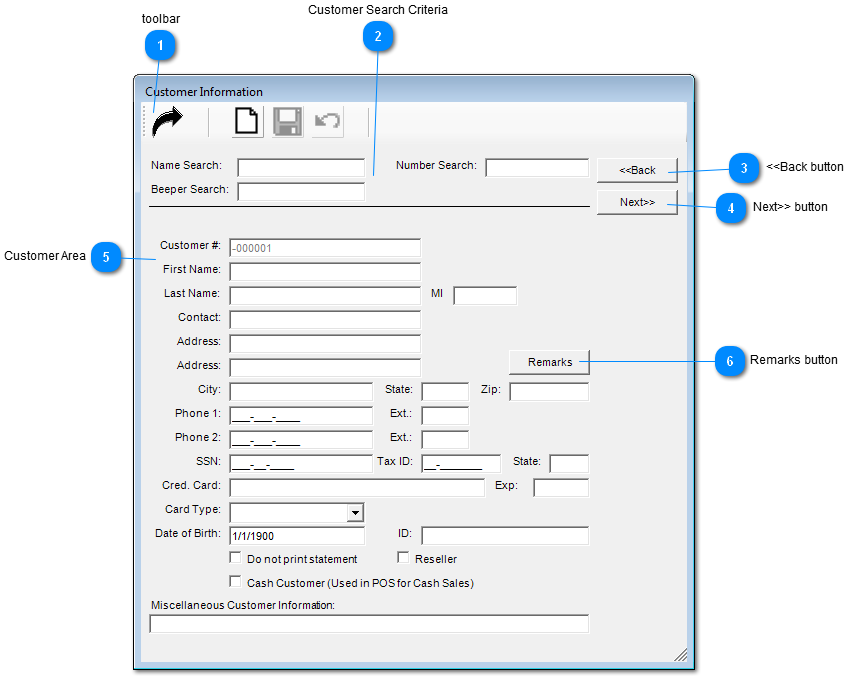
 toolbar
Functionality of buttons
 Exit Exit
 Print Print
 Save Save
 Redo Redo
| |
 Customer Search Criteria
| |
 <<Back button
Click on "Back" button to go previous customer.
| |
 Next>> button
Click on "Next" button to go next customer.
| |
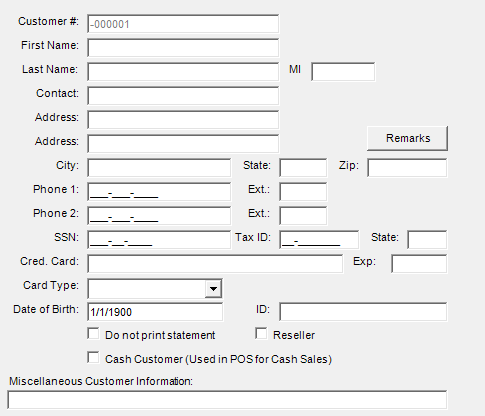
 Customer Area
|
Customer #
|
Customers unique Account number
|
|
First Name
|
Customers first name
|
|
Last Name
|
Customers last name
|
|
MI
|
Customers middle name initial
|
|
Contact
|
Person to reach in case customer cannot be reached
|
|
Address
|
Customers address information
|
|
Address
|
Continuation of Customers address information
|
|
Remarks Button
|
Click on this button to add Remarks / Comments
|
|
City
|
Customers city where address resides
|
|
State
|
Customers State where address resides
|
|
Zip
|
Customers mailing Zip Code
|
|
Phone 1
|
Customers primary phone
|
|
Phone 2
|
Customers secondary phone
|
|
SSN
|
Customers social security number
|
|
Cred. Card
|
Customers credit card number
|
|
Exp
|
Credit Card Expiration Date
|
|
Card Type
|
Dropdown of credit card selections
|
|
Date of Birth
|
Customers date of birth
|
|
ID
|
Customers Tax Id
|
Check Boxes:
-
Do not print Statement - Check if statement is not to be printed.
-
Reseller - Check if reseller.
-
Cash Customer (Used in POS for Cash Sales) - Check if Customer pays with cash.
Miscellaneous Customer Information: - Enter here any important information.
| |
 Remarks button
Click on "Remarks" button and post comments / remarks on customer.
| |
|
|