|
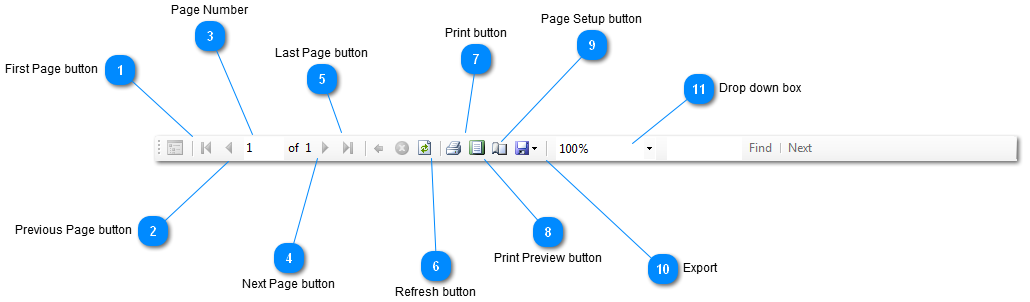
 First Page button
Click  and you will go back to the first page and you will go back to the first page
| |
 Previous Page button
Click  and you will go to the previous page and you will go to the previous page
| |
 Page Number
Put the page number you would like to go to and click enter
| |
 Next Page button
Click  and you will go to the next page and you will go to the next page
| |
 Last Page button
Click  and it will take you to the last page and it will take you to the last page
| |
 Refresh button
Clicking  will refresh the report. will refresh the report.
| |
 Print button
Click  to print out your customer list. to print out your customer list.
| |
 Print Preview button
Click  and you will go to the print preview window. and you will go to the print preview window.
| |
 Page Setup button
Click  to go to the page setup menu to go to the page setup menu
| |
 Export
Click  and a drop down box will generate with the options of where to export your customer list. and a drop down box will generate with the options of where to export your customer list.
| |
 Drop down box
Clicking the  generates a drop down box with the options to make the customer list bigger or smaller. generates a drop down box with the options to make the customer list bigger or smaller.
| |
|
|