|
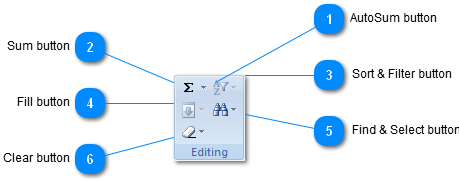
 AutoSum button
| |
 Sum button
Display the sum of the selected cells directly after the selected cells.
| |
 Sort & Filter button
Arrange data so that it is easier to analyze.
You can sort the selected data in ascending or descending order, or you can temporarily filter out specific values.
| |
 Fill button
Continue a pattern into one or more adjacent cells.
You can fill cells in any direction and into any range of adjacent cells.
| |
 Find & Select button
Find and select specific text, formatting, or type of information within the workbook.
You can also replace the information with new text or formatting.
| |
 Clear button
Delete everything from the cell, or selectively remove the formatting, the contents, or the comments.
| |
|
|