|
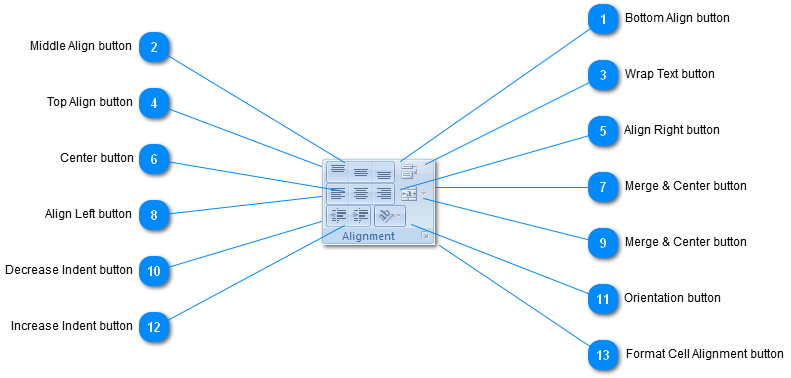
 Bottom Align button
Align text to the bottom of the cell.
| |
 Middle Align button
Align text so that it is centered between the top and bottom of the cell.
| |
 Wrap Text button
Make all content visible within a cell by displaying it on multiple lines.
Press F1 for more help.
| |
 Top Align button
Align text to the top of the cell.
| |
 Align Right button
Align text to the right.
| |
 Center button
Center text.
| |
 Merge & Center button
| |
 Align Left button
Align text to the left.
| |
 Merge & Center button
Joins the selected cells into one larger cell and centers the contents in the new cell.
This is often used to create labels that span multiple columns.
Press F1 for more help.
| |
 Decrease Indent button
Decrease the margin between the border and the text in the cell.
| |
 Orientation button
Rotate text to a diagonal angle or vertical orientation.
This is often used for labeling narrow columns.
Click the currently selected text orientation again to reset the text back to normal orientation.
Press F1 for more help.
| |
 Increase Indent button
Increase the margin between the border and the text in the cell.
| |
 Format Cell Alignment button
Show the Alignment tab of the Format Cells dialog box.
| |
|
|