|
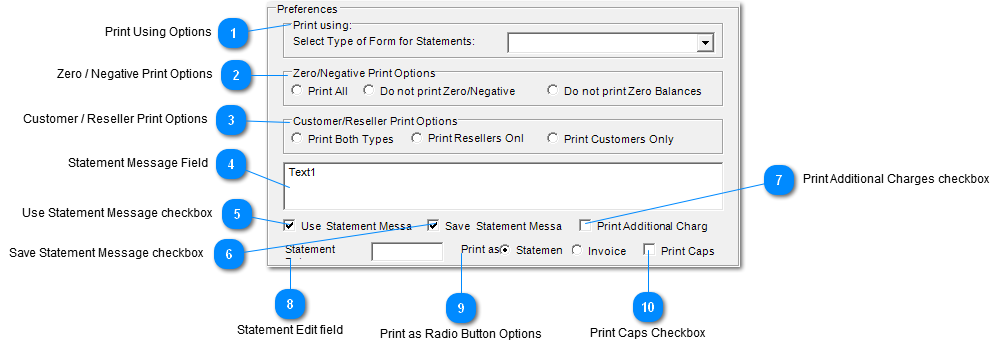
 Print Using Options
Select from the dropdown type of form the statements are to be printed on.
Selections:
| |
 Zero / Negative Print Options
Select Zero / Negative Print Radio button option for statement criteria.
Selections:
-
Print All - Print Zero and Negative balances in Statements.
-
Do not print Zero / Negative - Do not include and Zero or Negative balances in Statements.
-
Do not print Zero Balances - Do not include the Zero Balances in Statements.
| |
 Customer / Reseller Print Options
Select one of the Customer / Reseller Print Radio button Options to be included in the Statements.
Selections:
-
Print Both Types - Include both types in Statements Reseller and Customers.
-
Print Resellers Only - Include only Reseller type in Statements.
-
Print Customers Only - Include only Customer type in Statements.
| |
 Statement Message Field
Enter a statement message here.
| |
 Use Statement Message checkbox
Check "Use Statement Message" Checkbox to include the message in the Statement Message Field.
| |
 Save Statement Message checkbox
Check "Save Statement Message" checkbox to save the message in the Statement Message Field.
| |
 Print Additional Charges checkbox
Check "Print Additional Charges" checkbox to include any additional charges to statements.
| |
 Statement Edit field
| |
 Print as Radio Button Options
Select "Print as" radio button option for statement criteria.
Selections:
| |
 Print Caps Checkbox
Check "Print Caps" checkbox to print all caps.
| |
|
|